
Some weeks ago, we informed you about the release of the new header and menu. Today we want to share that we have updated that initial version. Below in this post, we tell you what the new benefits are and how you can activate it.
What has changed?
Currently, there are multiple menus, and sometimes one on the left side of the screen, sometimes on the top of the screen.
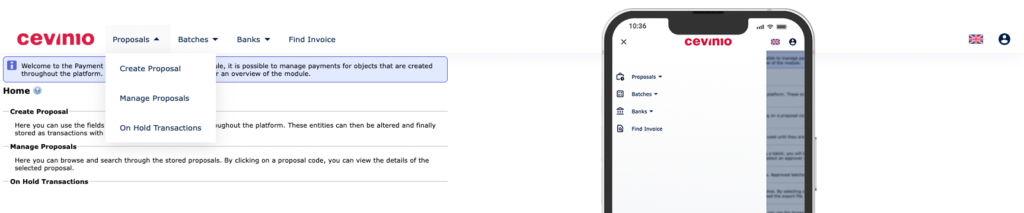
In the updated new header, we have combined the menu and the header in one single place, which results in a uniform interface. See below a screenshot of our new header.
Some of the benefits of this new menu are that it is easy to navigate, and it will suit our future design upgrades. Also, the menu is responsive and will be pleasant to use on small screens or mobile devices:
How do I activate the new menu?
For users:
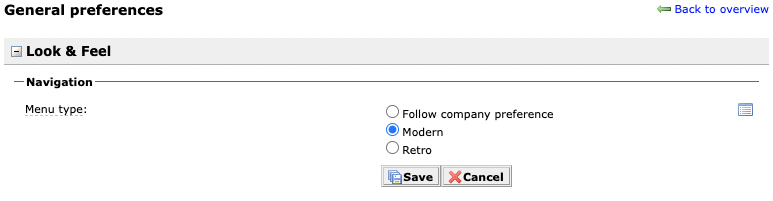
Go to the preferences module, select “My preferences” and then, click on “General”. In the “Look & Feel” section, you have 3 options. “Follow company preference”, “Modern” and “Retro”. Here you can switch between the old (Retro) and new (Modern) menu. Or you can follow what your company’s preference is.
For companies:
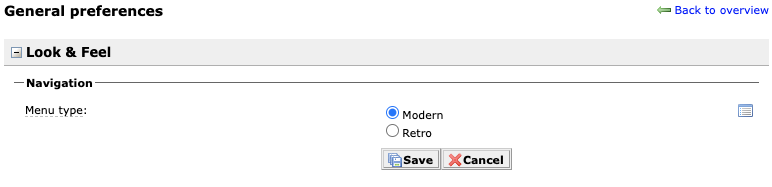
Go to the preference module, select “General” and in the Look & Feel section, you can select the “Modern” or “Retro” menu type. Here you can select a preferred menu for your team, however, they are still able to change the menu type for themselves.
Cevinio Monthly Update
At Cevinio, we are committed to providing our clients with a future-proof invoice automation solution. In order to achieve that, we are continuously working on developing new features and functionalities. Once a month, we will keep you up-to-date on the top releases, new features, and bugs fixed we did.