
Voor de Nederlandse versie, klik hier
Dear,
Shall we start the new week with a positive announcement? As you know, at Cevinio, we’re committed to enhancing your experience by providing a more consistent, intuitive, and modern user interface. In line with this commitment, we’ve made several improvements to the navigation menu in your Cevinio system. For some time, the “retro” and the “modern” designs co-existed, but we’ve decided to retain only the “modern” menu to deliver the best experience for all users.
What’s changing?
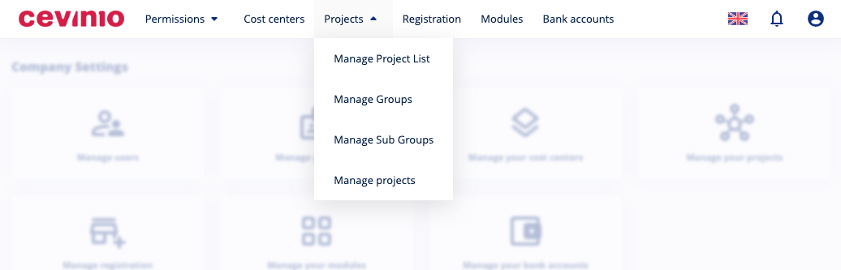
As of November 18, 2024, the “modern” menu will become the standard interface for all users. The “retro” menu won’t be available anymore. See an example of the “modern menu” in the image below.
Why the Change?
- Consistency and usability: A single menu layout ensures consistency, making it easier for users to navigate across Cevinio without needing to adapt to different menu positions.
- Enhanced support and updates: With one standard interface, we can more efficiently provide updates, support, and improvements, allowing us to focus on enhancements that benefit your overall experience.
- Sleeker, more modern look: The “modern” menu provides a cleaner look and feel, aligning with the latest design standards.
What do you need to do?
No action is required on your part. The change will automatically take effect on November 18, 2024. From this date, you’ll notice the modern header menu as the primary navigation interface.
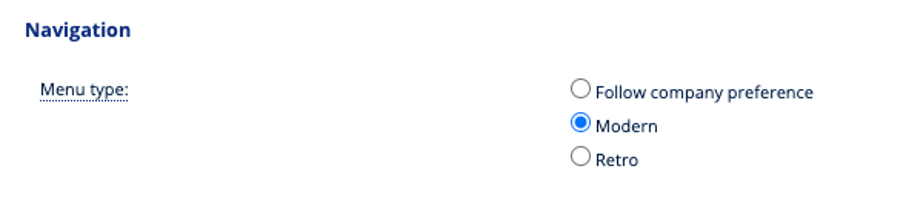
Haven’t tried the new menu yet? Go to the Preferences module, select “Personal Preferences -> My Preferences -> General -> Navigation.” Set the option to “Modern.” You may need to log in again to see the new menu.
If you have any questions or feedback about this update, please feel free to reach out to us at support@cevinio.com. We’re here to assist you every step of the way.
Kind regards,
The Cevinio Team